


MB STUDIO 8.82
MB STUDIO version 8.82 - MB REMOTE - MB LIVE version 1.82 available

Compared to the previous version:
HARDWARE ADVICE (JUNE 2026)
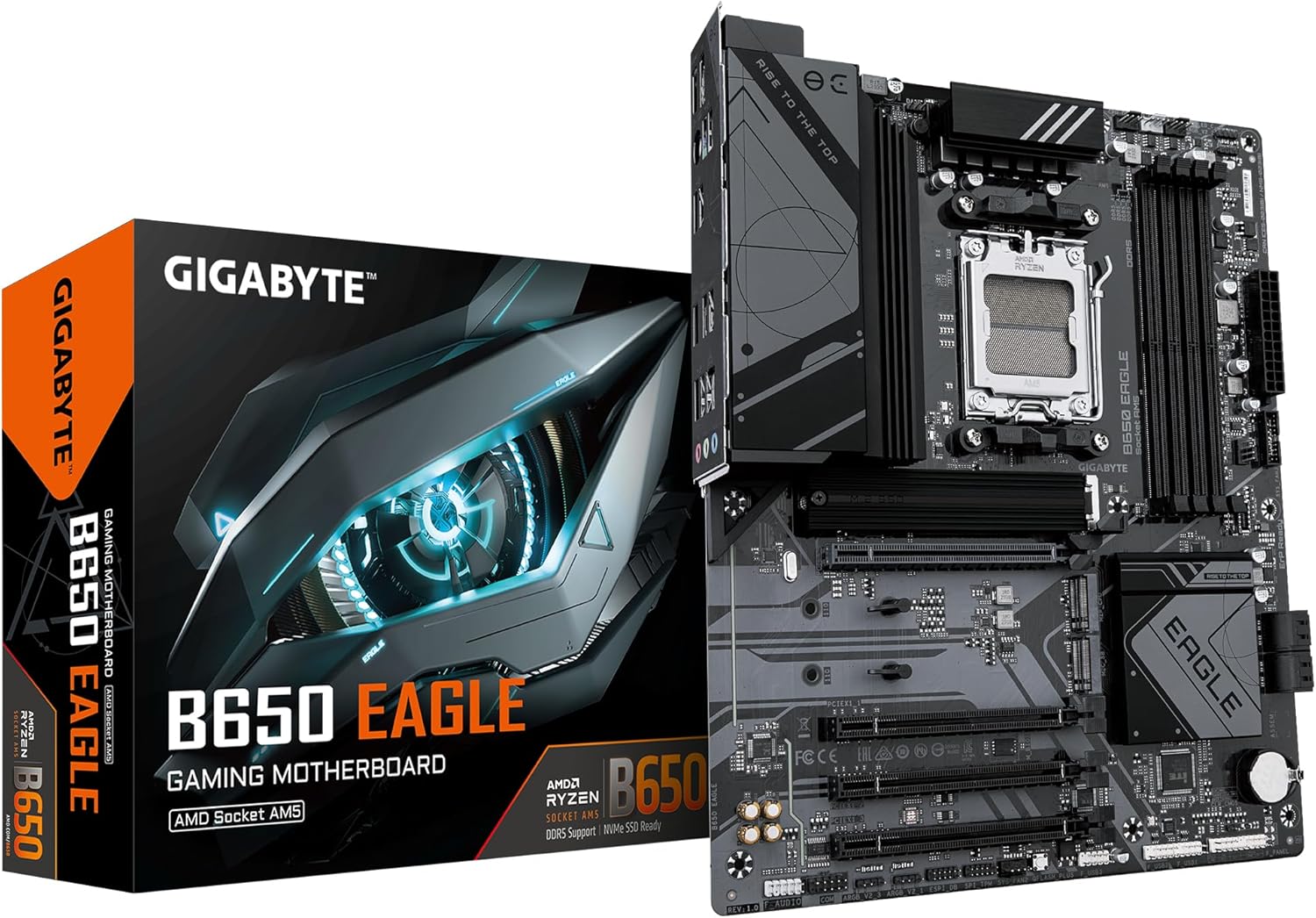
I'm often asked for advice on the ideal computer for using MB STUDIO and MB STUDIO VIDEO. It's not easy to answer because the hardware on sale is constantly changing, and new isn't necessarily better than old. My advice is to not buy an Intel CPU. Instead, buy these components and have them assembled by a technician; it will cost you less and work better. Here are some components I currently use that work very well. This isn't the fastest computer you can get, but it's the best value for money.
MB STUDIO 8.81.3
MB STUDIO version 8.81.3 available
Compared to the previous version:
-
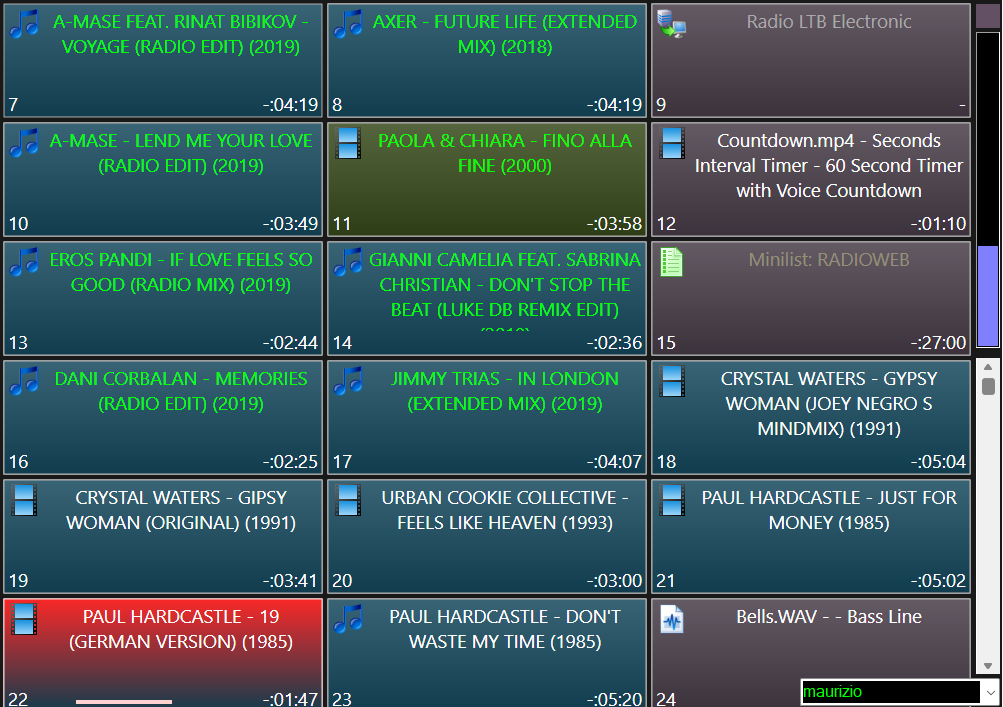
- Video: smoother video transitions
- Video: Analog or digital clock, fully configurable for fonts, colors, and background image.VIDEO - CLOCK
- Video: more videographic Smoother using Windows Direct2D
- Video: added slider to adjust the height of video graphics rectangles VIDEO - VIDEO POSITION
- Download: In the download tab, a new option is added to automatically set a cue point for the start and end of playback.
- Agenda: Added a force option to the AGENDA - Waiting for dtmf or metadata
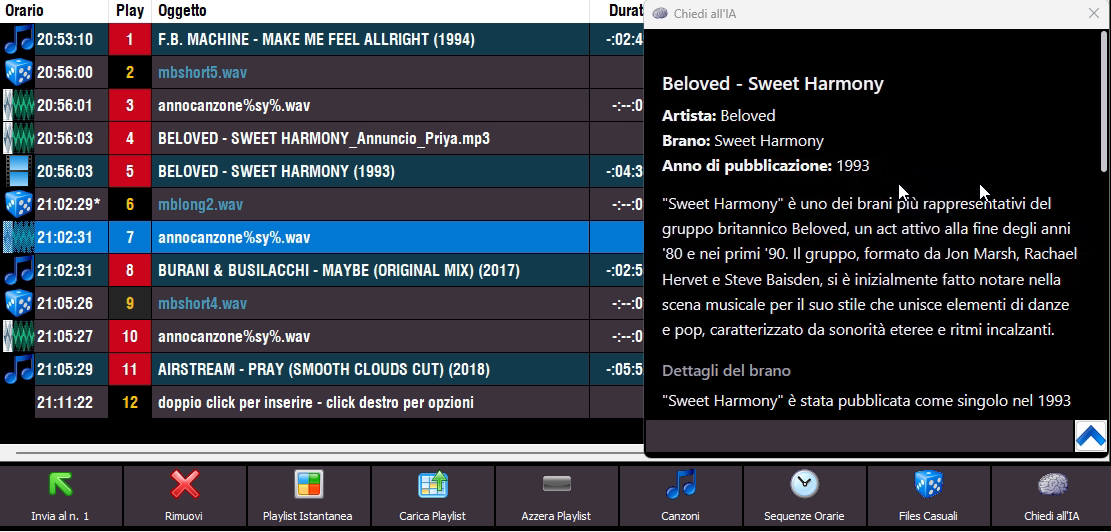
SPEECH VOICES: END OF SAPI SUPPORT
With the introduction of new synthetic voice technology from ElevenLabs, OpenAI TTS, Inworld TTS, Gemini TTS, and Google Cloud TTS, MB STUDIO 8.80 is the last version of MB STUDIO to support the legacy Windows SAPI synthetic voices.
Starting with MB STUDIO 8.81, the legacy Windows SAPI synthetic voices are no longer usable.
FORUM
-
-

- GR LOCALE VOCI SINTETICHE
- si appunto bisogna cliccarle, l'ai non lo fa per te
-
-
-

- CERCO LICENZ MB STUDIO LITE o PRO
- T ho risposto in privato
-
-
- Mb Studio con D&R Airlite
- Il Virtual Keyboard Mapper lo devi aprire come amministratore ( e prima devi aver lanciato il Control che sia Webstation, airlite ) e poi il resto viene da se...
-
- coder rds processore rds
- 1 DM Vibe 6 FM Audio Processor6-Bands Audio Processor with Built-in RDS encoder 1 CODER RDS & STEREO STARGATE AEV
-
-
- Modello Email
- non esiste piu' poiche' ormai le richieste sono via sms o whatsapp o telegram
-
-
-

- Database collaborativo dei punti di mixaggio
- Grazie per il tuo riscontro. Sono aperto a qualsiasi suggerimento per migliorare lo strumento. Non esitare.
-
In case of login problems read here
MB STUDIO VIDEO
-
2026
- MB LIVE - VIDEO CONFIGURATION
- MB LIVE - VIDEO CAMERA CONFIGURATION
- MB STUDIO 8.82
- VIDEO: LOADING / SAVING SCENES
- AI PROMPT: AI-GENERATED ADS
- VIDEO: SHOWING A WHATSAPP VIDEO CALL
- EBU R 128
- HARDWARE ADVICE (JUNE 2026)
- MB STUDIO 8.81.3
- MB STUDIO 8.81.2
- TIME ANNOUNCEMENT WITH SYNTHETIC VOICE
- SONG: AUTOMATIC ANNOUNCEMENT WITH SYNTHETIC VOICE
- MB STUDIO 8.81
- SPEECH VOICES: PROVIDERS LIST
- SPEECH OBJECT
- GOOGLE CLOUD TTS API KEY
- SPEECH VOICES: END OF SAPI SUPPORT
- MB SPOT - PLAYING THE TEASER OF A SONG BEFORE A COMMERCIAL
- MB SPOT – MANAGEMENT OF ADVERTISING END TAGS
- FAQ: AN ... UNEXPECTED COMMENT
- VIDEO: END OF WINDOWS 10 SUPPORT
- INWORLD API KEY
- OPENAI CHATGPT API KEY
- ELEVENLABS API KEY
- GEMINI API KEY
- ASK THE AI
- CONFIGURATION - SPEECH VOICES
-
2025
- PLAY ALL - AUTOPLAY - AUTOMATIC
- WINDOWS STUDIO EFFECTS
- WEBCAM ADVICE (DECEMBER 2025)
- COMPLETELY DIFFERENT PLAYLISTS FOR ONE DAY
- MB STUDIO 8.80.7
- MB STUDIO: HOW TO INSTALL (OR REINSTALL)
- 404 Error Message From MB Studio Updates
- VOLUME: CORRESPONDENCE BETWEEN DB AND VOLUME IN MB STUDIO
- MB STUDIO 8.80.6
- MB STUDIO 8.80.5
- MB STUDIO 8.80.4
- NOTICE FOR WINDOWS 10 USERS
- MB STUDIO 8.80.3
- SONGS - THE ICONS OF THE LIST
- MAYA 44 EX: NOTICE
- VIDEO - EXTERNAL APPLICATION
- CONFIGURATION - COVER ART
- MB SMS: REMOTE CONTROL MB STUDIO VIA SMS - WHATSAPP - TELEGRAM
- CONFIGURATION - DEFAULT FOLDERS
- MB STUDIO 8.80
- AGENDA: EXPORT TOP 40 SONG LIST
- WEB EXPORT: PUBLISH UPCOMING OR BROADCASTED SONGS
- MB SMS: CUSTOMIZE MUSICLINE SERVICE RESPONSES
- MB SMS: READING MESSAGES
- MUSICLINE: PUBLISH THE LIST OF REQUESTABLE SONGS
- MB SMS: CONFIGURATION
- MB SMS: INSTALLATION ON YOUR ANDROID PHONE
- CONFIGURATION - PHONE
- MENU - Add this file to the playlist
- MB SMS: WHICH PHONE TO USE
- MB SMS: DEACTIVATE PLAY PROTECT
- NOTICE - USB SMS MODEM SUPPORT ENDED
- MB LIVE ANDROID 1.79.7.7
- MB STUDIO 8.79.7
- WEBCAST - HOW TO INVESTIGATE DISCONNECTIONS
- SONGS - ASSOCIATED TITLE
- VIDEO - DISPLAY INCOMING MESSAGES
- SONGS - RESTORE LIBRARY
- MB STUDIO 8.79.5
- MB STUDIO 8.79.4
- MB STUDIO 8.79.3
- EXTERNAL STREAM: PROGRAMMING AND DISCONNECTION MANAGEMENT
- MB STUDIO 8.79.2
- INTERCONNECTION AND ADVERTISING SPLITTING VIA INTERNET
- MB STUDIO 8.79.1
- HOW TO USE A USB MICROPHONE WITH LOW LATENCY
- AGENDA - Waiting for dtmf or metadata
- LOW LATENCY AUDIO SERVER
- MB SPOT - ADD TIMES TO AN ADVERTISING SPOT THROUGH A CALENDAR
- MB STUDIO 8.79
- VIDEO - CLOCK
- MB SPOT - MANUALLY SELECTING THE TIMES OF A SPOT
- MB SPOT - PRINT MODELS
MB RADIO

Who's Online

1 / 2 / 3 years of MB STUDIO HOME software updates (license expired less than 3 years ago)

-
CONFIGURATION
-
INSTALLATION OR UPDATE
-
MB LIVE
-
MB REMOTE
-
MB SMS
- MB SMS: REMOTE CONTROL MB STUDIO VIA SMS - WHATSAPP - TELEGRAM
- MB SMS: CUSTOMIZE MUSICLINE SERVICE RESPONSES
- MB SMS: READING MESSAGES
- MUSICLINE: PUBLISH THE LIST OF REQUESTABLE SONGS
- MB SMS: CONFIGURATION
- MB SMS: INSTALLATION ON YOUR ANDROID PHONE
- MB SMS: WHICH PHONE TO USE
- MB SMS: DEACTIVATE PLAY PROTECT
-
MB SPOT
- MB SPOT - PLAYING THE TEASER OF A SONG BEFORE A COMMERCIAL
- MB SPOT – MANAGEMENT OF ADVERTISING END TAGS
- MB SPOT - ADD TIMES TO AN ADVERTISING SPOT THROUGH A CALENDAR
- MB SPOT - MANUALLY SELECTING THE TIMES OF A SPOT
- MB SPOT - PRINT MODELS
- MB STUDIO - SPLITTING ADS CONFIGURATION
- MB SPOT - NEWS SECTION
-
MB STUDIO GUIDE HELP
- FAQ: AN ... UNEXPECTED COMMENT
- ASK THE AI
- VOLUME: CORRESPONDENCE BETWEEN DB AND VOLUME IN MB STUDIO
- AGENDA: EXPORT TOP 40 SONG LIST
- WEB EXPORT: PUBLISH UPCOMING OR BROADCASTED SONGS
- MENU - Add this file to the playlist
- WEBCAST - HOW TO INVESTIGATE DISCONNECTIONS
- EXTERNAL STREAM: PROGRAMMING AND DISCONNECTION MANAGEMENT
- INTERCONNECTION AND ADVERTISING SPLITTING VIA INTERNET
- HOW TO USE A USB MICROPHONE WITH LOW LATENCY
- AGENDA - Waiting for dtmf or metadata
- AGENDA - SYNCHRONIZING A LOCAL FOLDER WITH A REMOTE FTP FOLDER
- MUSICLINE - AUTOMATIC MUSIC REQUEST SERVICE
- MB STUDIO - HOW TO DOWNLOAD AN ENTIRE FOLDER FROM AN FTP SERVER
- REMOTE SUPPORT
-
PLAYLIST
-
SONGS LIBRARY
-
SPEECH VOICES
-
VIDEO PLUGIN
- VIDEO: LOADING / SAVING SCENES
- VIDEO: SHOWING A WHATSAPP VIDEO CALL
- VIDEO - EXTERNAL APPLICATION
- VIDEO - DISPLAY INCOMING MESSAGES
- VIDEO - CLOCK
- VIDEO - Displays the title of the object on the video output
- VIDEO - STREAM TO YOUTUBE
- VIDEO - DOWNLOAD OR LIVE BROADCAST VIDEO FROM X - FACEBOOK - INSTAGRAM AND MANY OTHER SITES
- CONFIGURATION - VIDEO - OPTIONS3 - LOGO
- VIDEO: HOW TO OVERLAY A VIDEO ON ANOTHER VIDEO (Picture in picture)
- FAQ: DESKTOP TICKER THAT DOESN'T SCROLL
- FAQ: WHITE SPOTS IN THE VIDEO WINDOW
- VIDEO - STREAM TO FACEBOOK
- VIDEO - CHANGE CAMERA EVERY XX SECONDS
- CONFIGURATION - VIDEO - OPTIONS3 - COUNTDOWN
- CONFIGURATION - VIDEO - OPTIONS3 - OVERLAY
- CONFIGURATION - VIDEO - OPTIONS3 - WEATHER
- VIDEO - NEWS TICKER
- CONFIGURATION - VIDEO - OPTIONS2 - TEXT OVERLAY
- FAQ: BORDER LINE TO THE VIDEO WINDOW
- VIDEO - SERVER RTSP - HLS
- VIDEOS - THE BEST GPUS FOR MB STUDIO
- VIDEO - SRT ENCODER
- VIDEO - HOW TO SYNC AUDIO AND VIDEO
MB STUDIO HOME / LITE / PRO
 MB STUDIO is a radio automation software that will allow you to create and manage your own radio station playing all your media files: jingles, commercials, news, songs, Files from internet, live streams, live inputs from your sound card, satellite feeds. Automatically download news and shows from Internet. Multiple overlapping files and/or live sources (mic, line, aux). Voice tracking. Integrated CD Ripper. Integrated jukebox to play songs requested via sms / email messages. Display current playlist on your web site.
MB RECASTER PRO
 MB RECASTER features an audio recorder with scheduler, a webcast module to send streams to any Shoutcast, Icecast or Windows Media server, AutoDJ function to play randomly your own audio files from up to 4 folders, a stream receiver allowing to record or recast to your server (transcoder), an audio converter from/to any format.
MB LIVE
 MB LIVE is a software that stream a live audio\video feed from any place to an MB STUDIO PRO automation in the main radio studio. MB LIVE make use of a TCPIP connection. This program is free for MB STUDIO PRO users