
In this article MB STUDIO - DOWNLOAD FUNCTION we have already seen how to download a file from the internet.
Here we see how to download a folder from an ftp server to our local disk
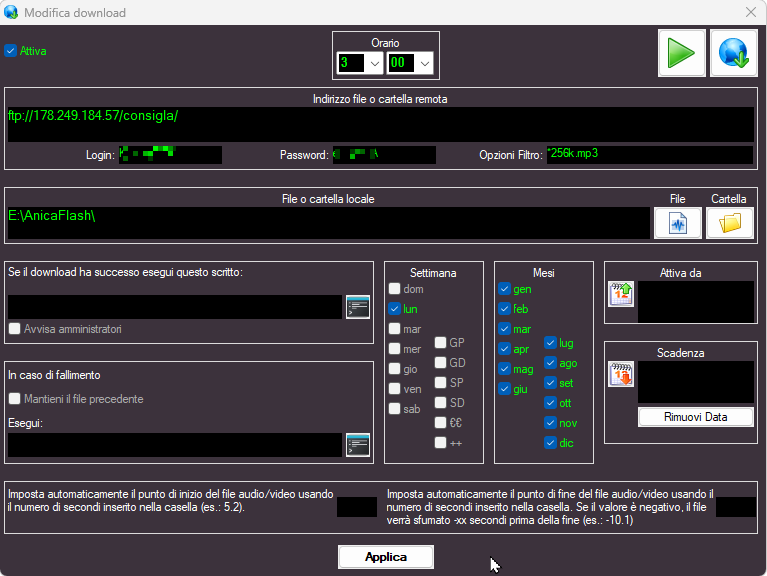
Remote folder address: here we write the path that leads to the folder we want to download (must end with / )
Local folder: Click the "FOLDER" button and choose the destination folder
Filter options: here we can leave blank or write the extension of the files we want to download (for example *.mp3 to download only the mp3 files that are in the remote folder)
 MB STUDIO is a radio automation software that will allow you to create and manage your own radio station playing all your media files: jingles, commercials, news, songs, Files from internet, live streams, live inputs from your sound card, satellite feeds. Automatically download news and shows from Internet. Multiple overlapping files and/or live sources (mic, line, aux). Voice tracking. Integrated CD Ripper. Integrated jukebox to play songs requested via sms / email messages. Display current playlist on your web site.
 MB RECASTER features an audio recorder with scheduler, a webcast module to send streams to any Shoutcast, Icecast or Windows Media server, AutoDJ function to play randomly your own audio files from up to 4 folders, a stream receiver allowing to record or recast to your server (transcoder), an audio converter from/to any format.
 MB LIVE is a software that stream a live audio\video feed from any place to an MB STUDIO PRO automation in the main radio studio. MB LIVE make use of a TCPIP connection. This program is free for MB STUDIO PRO users