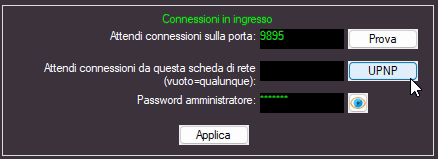
The UPnP button allows for the automatic opening of the TCP ports required to receive external connections for MB LIVE and MB REMOTE.
This configuration can only be performed if the UPnP service is enabled on your internet router.
To check if it is enabled:
- access your router's configuration settings;
- look for an option such as UPnP, Universal Plug and Play, NAT-PMP, or Port Mapping;
- verify that it is set to "Enabled".
If the UPnP configuration is successful, click the TEST button.

The test result should appear in an "OK" window.

If, however, you receive an error window stating "Can't connect!", it may mean that:
- your internet connection does not have a public IP address;
- your Windows network is not set as a private network;
- security software installed on your computer is blocking TCP access to MB STUDIO.